
Meta Ads Creative Fatigue: How to Identify It and Refresh Creatives Without Guesswork
A rising frequency number isn't a diagnosis, and neither is a falling CTR. Here's how to tell whether a Meta campaign's decline is actually creative fatigue, or something else wearing the same symptoms.
Introduction
The moment most advertisers decide their creative is fatigued isn't when they've diagnosed it. It's when the number they're staring at has gotten uncomfortable to look at. CTR has slipped, cost per result has climbed, and the instinct is to swap the ad and move on. Sometimes that instinct is right. Just as often, the creative isn't the problem at all — the audience has been narrowed twice since launch, the landing page changed, or the attribution window got remapped three weeks ago and nobody connected the dots.
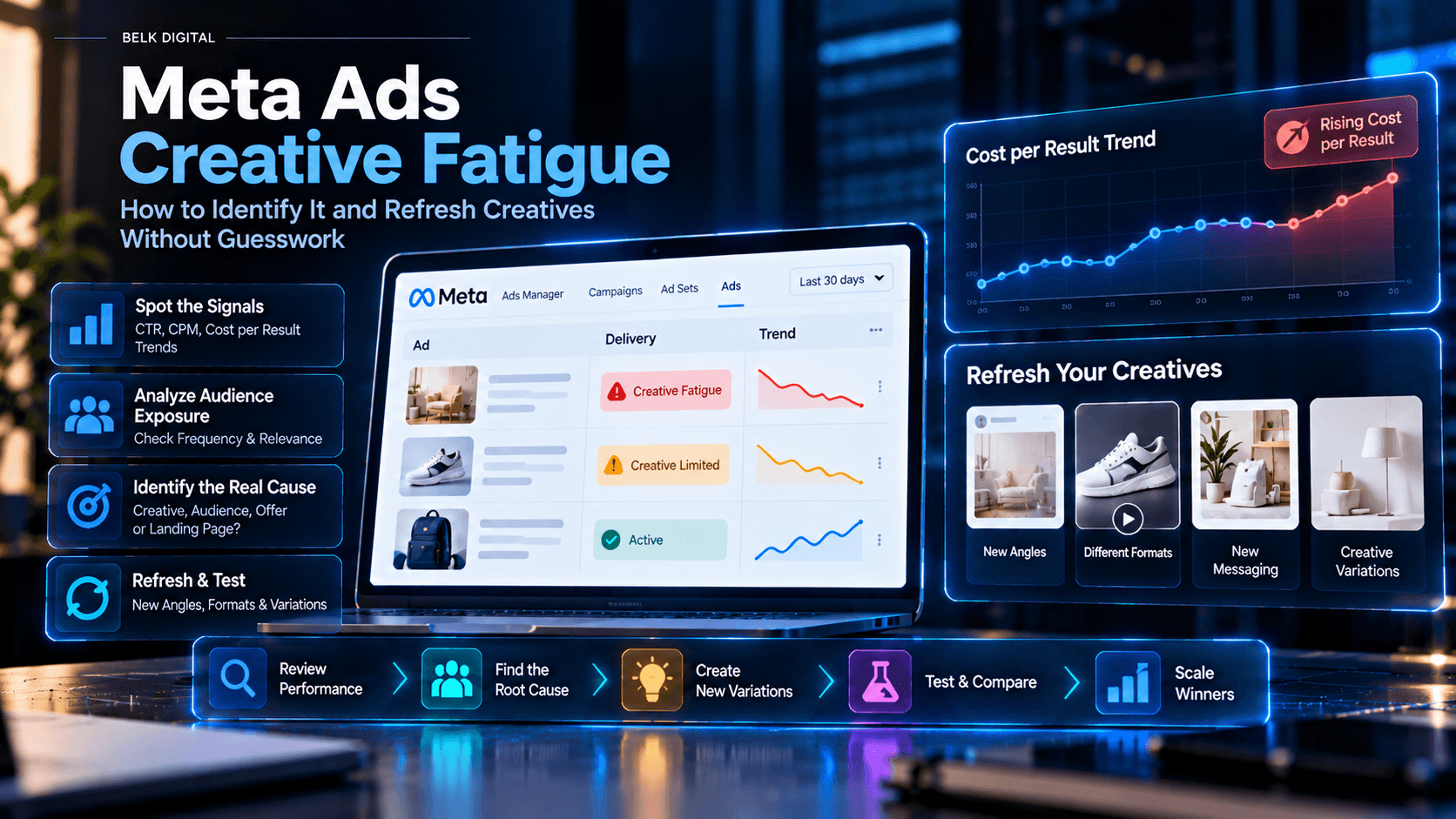
Creative fatigue is a real, specific phenomenon, not a catch-all explanation for a campaign that's underperforming. Meta's Ads Manager actually labels it directly in the Delivery column, with two related statuses, and the way those statuses get assigned is itself a useful clue: Meta flags an ad as Creative Fatigue when its cost per result has climbed to roughly double what it was previously, and as the milder Creative Limited when cost per result has risen but hasn't doubled. That's a cost-per-result-based signal, not a frequency-based one — which already tells you something: a high frequency number by itself isn't what trips the label, and it shouldn't be what trips your decision either.
This guide walks through how to tell creative fatigue apart from the half-dozen other things that produce the same symptoms, how to confirm it using more than one signal, and how to refresh and test a replacement without just trading one guess for another.
What is Meta Ads creative fatigue?
Creative fatigue describes a decline in an ad's performance that's connected to how many times the same audience has already seen it, rather than to a change in targeting, budget, offer, or tracking. The idea is simple: an audience that's seen a creative repeatedly tends to engage with it less over time, and at some point the ad stops pulling its weight relative to what it cost to keep running.
What makes this harder to diagnose than it sounds is that Meta's own fatigue label is a downstream signal, not a cause. According to Jon Loomer's documentation of the feature, Meta assigns the Creative Fatigue delivery status specifically when cost per result has roughly doubled relative to its earlier level, and Creative Limited when cost per result has risen but by less than that. In other words, Meta is reading the symptom — a worsening cost outcome — and labeling it fatigue without necessarily confirming that repeated exposure is actually what caused it. A cost-per-result spike driven by a tracking change, a narrower audience, or a weaker landing page can trigger the same label.
That's not a reason to ignore the label. It's a reason to treat it as a prompt to investigate, not as a finished diagnosis.
Signs your Meta ad creative may be losing effectiveness
None of the following, on its own, proves creative fatigue. Together, and compared against your own account's history, they start to build a case.
- Frequency climbing alongside other signals. Rising frequency isn't inherently bad — there's no universal bad number — but a frequency increase that coincides with a cost or engagement decline is worth lining up against the timeline.
- Outbound or link CTR declining over a consistent period, not just a single day's fluctuation.
- CPM rising without a corresponding change in your budget, bid strategy, or competitive landscape that would explain it.
- Cost per result or CPA increasing, especially if it's climbed toward or past double its earlier level — the same threshold Meta's own Creative Fatigue label appears to use.
- Conversion rate softening even where CTR has held relatively steady, which can point toward the landing page or offer rather than the ad itself.
- Meta's own Delivery column showing Creative Fatigue or Creative Limited. Treat this as a flag to investigate with the signals above, not as the investigation's conclusion.
How to diagnose creative fatigue in Ads Manager
- Pick a consistent date range — long enough to smooth out day-to-day noise, short enough to stay relevant to the current ad set's actual run.
- Compare against a real baseline, not an assumption. Use the ad's own earlier performance window, during a period with a similar objective, budget, and audience size.
- Look at the right level. A campaign-level dip can hide one ad set doing fine and another doing badly; drop down to ad-set and ad level before concluding anything about the creative specifically.
- Review frequency, CTR, CPM, and cost per result together, not one at a time. A single bad metric is a lead, not a verdict.
- Check the Delivery column for Meta's own fatigue-related status flags, and note which one — Creative Fatigue or Creative Limited — since that distinction (roughly doubled cost per result versus a smaller rise) tells you how far the decline has already gone.
- Identify when the change actually started. A decline that lines up with a budget change, an audience edit, or a tracking update points away from the creative itself.
- Form one specific hypothesis — a cost-per-result climb that started the week a lookalike audience got narrowed is testable; a vague sense that the ad is tired is not.
- Decide what to check next based on that hypothesis, before touching the creative.
Creative fatigue vs. other Meta Ads performance problems
| Possible cause | What to check | Reasonable next step |
|---|---|---|
| Creative fatigue | Cost per result trend, frequency trend, Delivery column status, timing of the decline relative to ad age | Introduce a genuinely distinct new creative into the ad set, or test a refresh |
| Audience saturation | Audience size versus spend and frequency, reach growth slowing while frequency climbs | Consider audience expansion or broader targeting options before assuming the creative is at fault |
| Budget, bid, or delivery changes | Recent edits to budget, bid strategy, or campaign objective logged against the decline's start date | Review the change log before making a creative decision |
| Weaker offer | Conversion rate and down-funnel metrics relative to the ad's engagement metrics | Evaluate the offer and pricing independently of the ad creative |
| Landing-page friction | Load time, mobile experience, message match between ad and page | Test the landing page separately from the ad |
| Tracking or attribution changes | Pixel, Conversions API, or attribution-window changes around the same period | Rule this out before concluding the creative caused the drop |
| Seasonality | Historical performance during the same calendar period in prior cycles, where available | Compare year-over-year or season-over-season rather than week-over-week alone |
| Insufficient data | Spend, impressions, and conversion volume relative to what the ad set needs for a stable read | Let the ad set gather more data before drawing a conclusion |
This table narrows the list of suspects. It doesn't replace checking your own account's actual change history — Ads Manager alone can't always tell you why a number moved, only that it did.
When should you refresh Meta ad creatives?
There's no universal refresh interval that applies across accounts, objectives, and audience sizes, and a fixed schedule — refresh every two weeks, every month — treats every campaign as if it behaves the same way. It doesn't.
What's more defensible is a decision built from your own baseline: how long has the decline held, is it consistent rather than a single bad day, does the campaign's objective and audience size make the decline plausible as exposure-driven, and have you ruled out the competing explanations above. A Creative Fatigue status that's persisted across a stable audience and budget for more than a few days, with no corresponding change elsewhere in the account, is a reasonably strong case for a refresh. A Creative Limited status on a campaign that just had its budget doubled is a weaker one — the cost shift may simply reflect the platform spending into a less efficient part of the audience, not a tired ad.
How to refresh creatives without guesswork
A refresh is only useful if it changes something connected to the suspected problem. If the hypothesis is exposure-driven fatigue in a well-targeted, stable audience, the fix that matches it is a genuinely different creative concept — not a palette swap or a new background on the same structure.
Worth considering, matched to what you think is actually tired:
- Concept and hook — a different opening idea, not a rephrased version of the same one.
- Format — static to video, or a different aspect ratio and placement mix, if the current format is where the exposure has concentrated.
- Message emphasis — leading with a different benefit or proof point, if the audience has simply seen the same pitch enough times.
- Visual execution — a distinct look, not a recolored version of the same layout.
- Offer presentation — only where the offer itself, not just its creative treatment, is in scope for this test.
Changing a headline font or swapping one product photo for another rarely produces a result worth measuring, because it rarely changes what the audience is actually tired of seeing.
How to test new Meta ad creatives fairly
Meta's current testing feature, called Experiments (found in Ads Manager's Tools menu under Analyze and Report), supports a structured A/B test: pick what to compare — campaigns, campaign groups, or ad sets — select two to five variations, set a schedule, and choose one key metric to determine the winner alongside up to nine additional metrics for context. The setup works best when the variations differ in exactly one meaningful way; comparing a new creative concept against the old one, with targeting, budget, and placement held constant, isolates the thing you're actually trying to learn.
A few things worth building into the test before it starts, rather than after:
- Write the hypothesis down first — what you expect to change, and why, before you see any results.
- Hold everything else constant apart from the one variable under test.
- Give it enough schedule length and spend to reach a real read; Experiments reports a confidence percentage, and a result with low confidence isn't a result yet.
- Expect the numbers to look a little worse than normal during the test itself — Meta restricts delivery overlap between variations while a test runs, which can make both sides look less efficient than they would in normal delivery.
- Record what you tested and what happened, win or lose, so the next decision in this account starts from evidence instead of memory.
How to measure whether the refresh worked
Measure the refresh against the same baseline and the same objective you used to diagnose the problem in the first place — not against whichever metric moved the most favorably. A new creative that lifts CTR but doesn't move conversion rate hasn't solved a cost-per-acquisition problem, even though the dashboard will look encouraging for a few days.
Give the comparison enough time and volume to be meaningful before calling it. A short burst of improved CTR in the first 48 hours can simply reflect novelty, not a durable fix, and a conversion-focused campaign needs enough completed conversions in the window to say anything reliable about CPA or ROAS. Where attribution windows or tracking changed between the old and new creative's measurement periods, account for that explicitly rather than comparing two numbers that were measured differently.
A practical creative-fatigue diagnostic checklist
- (Unchecked) Confirm a consistent date range for comparison.
- (Unchecked) Identify a genuine baseline period with a similar objective, budget, and audience.
- (Unchecked) Check frequency trend alongside, not instead of, cost and engagement metrics.
- (Unchecked) Check outbound/link CTR trend over the same period.
- (Unchecked) Check CPM trend and whether a budget or bid change could explain it.
- (Unchecked) Check cost per result or CPA trend, and note how far it's moved relative to baseline.
- (Unchecked) Check conversion rate separately from top-of-funnel engagement.
- (Unchecked) Note the Delivery column status (Creative Fatigue vs. Creative Limited vs. neither).
- (Unchecked) Pin down when the decline actually started.
- (Unchecked) Review the account's recent change log — budget, bid, audience, placement edits.
- (Unchecked) Check for recent tracking, pixel, or attribution changes.
- (Unchecked) Rule out a seasonal or external market explanation where historical data allows it.
- (Unchecked) Confirm the ad set has enough spend and data volume for a stable read.
- (Unchecked) Write a single, specific, testable hypothesis.
- (Unchecked) Decide the refresh element that actually matches the hypothesis.
- (Unchecked) Set up the test with one variable changed and the rest held constant.
- (Unchecked) Define the success metric and confidence bar before launching the test.
- (Unchecked) Document the test, the result, and the decision made from it.
Conclusion
A fatigue label, a rising frequency count, or a softening CTR are each worth noticing. None of them, alone, tells you what to do next. The accounts that handle this well aren't the ones that refresh creative on a schedule — they're the ones that check the pattern against their own baseline, rule out the other usual suspects, and test the replacement the same disciplined way they'd test anything else.
If you're staring at a declining Meta campaign and want a second set of eyes on whether it's actually creative fatigue or something upstream of the ad itself, Belk Digital can help you build a structured creative-testing process rather than guessing your way through another refresh.
Frequently Asked Questions
Need Expert Help with This?
If you’re looking to implement these strategies for your business, our team can help you plan, build, and scale with confidence.
ContactReady to Transform Your Digital Presence?
Let's discuss how we can help you achieve your digital goals and create an exceptional online presence.