AI Chatbots on Business Websites: Use Cases, Integration Costs, and When They Are Worth It
An AI chatbot can answer repetitive questions, capture enquiries, and route visitors to the right team — but it isn't automatically worth adding to every business website. Here's what a chatbot can realistically do, what it actually costs to run well, and the specific situations where a simple contact form still wins.
Introduction
An AI chatbot sitting in the corner of a website can answer a question at 11pm, capture a visitor's details before they close the tab, or save a support team from typing the same answer for the fortieth time that week. It can also be an expensive, half-maintained widget that frustrates visitors and quietly embarrasses the business that installed it. Both outcomes are common, and the difference usually comes down to whether the business picked the right use case, budgeted for the real costs, and built in a way for people to reach a human when the bot runs out of answers.
This guide is written for the business owner or manager trying to make that decision — not for someone who has already decided to buy a chatbot and just wants a vendor comparison. It covers what these tools can genuinely do, how they're built, what they cost beyond the subscription price, and the specific situations where implementing one doesn't make sense yet.
One distinction worth making immediately: this article is about a chatbot that lives *on* a business's own website, talking to that business's own visitors. It's not about getting a business recommended by ChatGPT or showing up in AI-generated search answers — that's a different topic (AI search visibility and generative engine optimization), and it's covered elsewhere. Here, the chatbot is a tool the business controls and configures, not something it's trying to influence from the outside.
What Is an AI Chatbot for a Business Website?
A website chatbot is a conversational tool, usually appearing as a chat widget, that interacts with visitors in something closer to natural language than a static FAQ page or a plain contact form. What it can actually do depends heavily on how it's built and configured — which is exactly why "chatbot" ends up meaning very different things across different implementations.
At the simple end, a chatbot follows predefined conversation paths: click a button, get a scripted answer, maybe reach a form. At the more capable end, a chatbot uses a language model to interpret varied, naturally phrased questions, retrieves information from the business's own approved content to ground its answers, and can take actions — creating a CRM record, checking appointment availability, notifying a team — through connections to other business systems. The type that fits a given business depends entirely on what it's being asked to do, which the next few sections work through in order.
What Can a Website Chatbot Do for a Business?
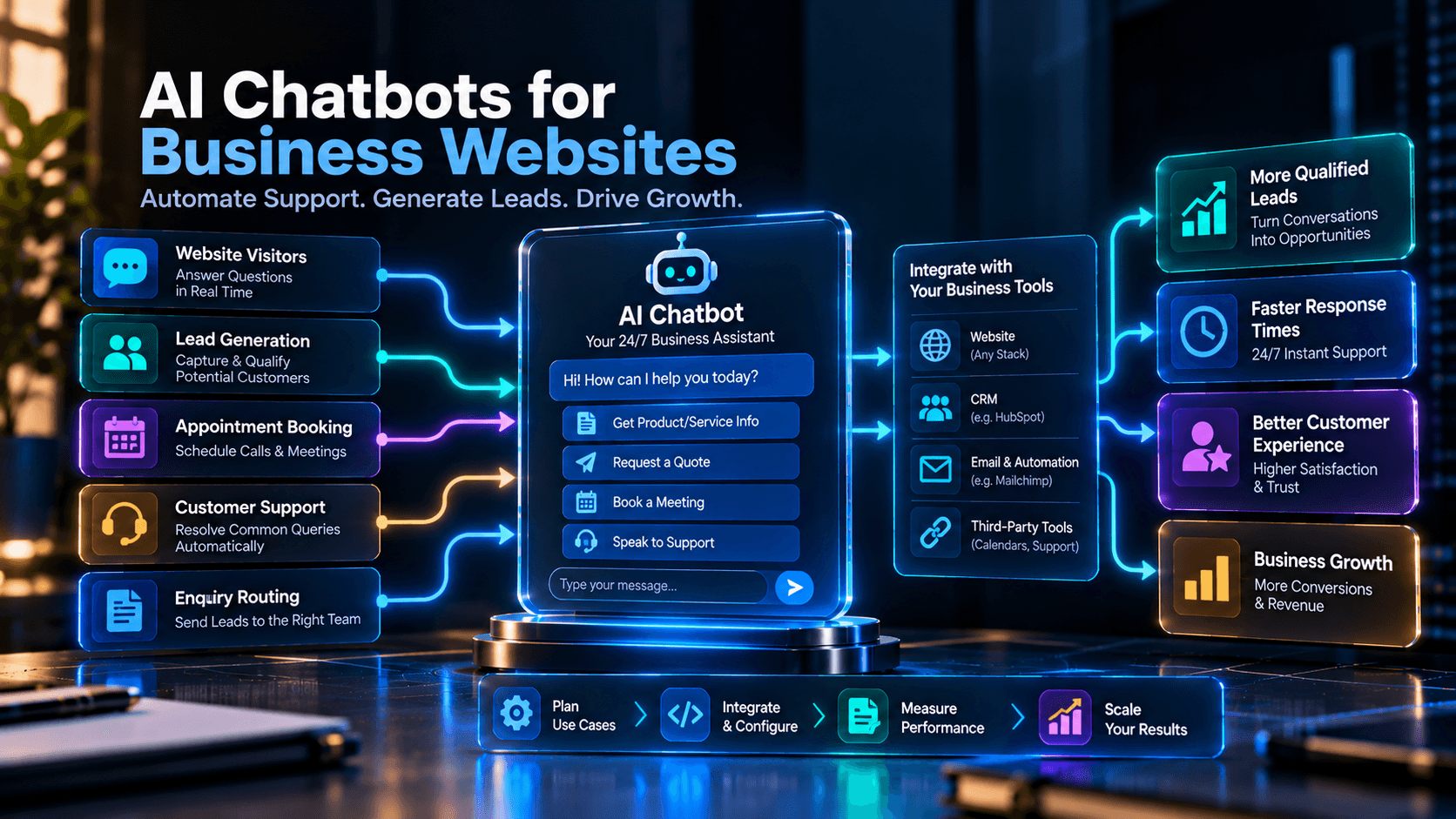
Three use cases tend to deliver the most practical value for small and mid-sized businesses, and they're worth prioritizing over more ambitious "AI agent" framing:
| Use case | Business problem | What the chatbot does | Required integration | Potential limitation |
|---|---|---|---|---|
| Customer support deflection | Repetitive questions consume staff time | Answers approved FAQs, explains hours/services, routes enquiries | Knowledge base, helpdesk, escalation workflow | Cannot safely resolve complex, sensitive, or account-specific issues without human review |
| Lead capture and qualification | Website visitors leave without enquiring, or sales gets unqualified enquiries | Starts a conversation, collects appropriate details, asks fit questions, routes to the right team | CRM, email/marketing automation, lead-routing workflow | Poorly designed qualification logic produces friction or low-quality leads; needs testing and maintenance |
| Appointment and enquiry routing | Scheduling and triage create back-and-forth | Explains availability, collects booking details, connects to scheduling, routes other enquiries | Scheduling tool/API, CRM/helpdesk | Requires accurate calendar availability and clear confirmation behavior |
A few other use cases show up often enough to mention, with the same caveat attached to each — they work when the underlying integration and content are actually in place, not just because a chatbot platform claims support for them:
- Product and service guidance — helping visitors navigate a complex site and find the right page, while escalating anything account-specific or uncertain.
- After-hours engagement — capturing enquiries and setting expectations when no one's available, without pretending to be a 24/7 human replacement.
- Internal workflow automation — creating tickets, notifying the right team, and updating CRM records automatically, which needs real permissions, testing, and error handling to work reliably.
How Chatbots Can Support Customer Service
The honest version of this use case: a chatbot is good at deflecting the questions that have one correct, stable answer — business hours, where to find a specific page, what a service generally includes, how to start a return. It's not a safe substitute for a human on anything that requires judgment, account access, or handling a frustrated customer.
The practical question for a business isn't "can a chatbot do customer support" — it's "which specific questions, out of everything our support team currently answers, have a consistent, approved, non-sensitive answer that doesn't change often." That list is usually narrower than businesses initially expect, and it's a far better starting scope than "replace our support inbox."
How Website Chatbots Can Generate and Qualify Leads
A chatbot can start a conversation with a visitor who might otherwise have left the page without any contact at all — which is real value, but it's worth being precise about what it actually produces: a captured contact, not automatically a qualified sales lead. Those are different things, and conflating them is one of the more common ways a chatbot project disappoints a sales team six months in.
Lead qualification is where a chatbot earns that distinction, by asking a short, specific set of questions — type of enquiry, basic requirements, service interest, rough timeline, preferred contact method — and using the answers to route the conversation to the right team with useful context attached, rather than dropping an anonymous "someone filled out a form" notification on everyone's desk. That qualification logic has to be built deliberately and tested against real conversations; it doesn't come configured correctly out of the box, and it's not something to set up once and never revisit. It's also worth restraint on what gets asked: collecting more than the qualification actually needs is friction without benefit, the same problem that shows up in lead-generation forms more broadly.
Can a Website Chatbot Handle Appointment Booking?
In principle, yes — explaining available time slots, collecting the details needed to book, confirming the request, and in some cases handling rescheduling. In practice, this only works as well as the scheduling integration behind it. A chatbot that confidently offers a time slot that's actually already taken, or that fails to pass booking details through correctly, creates a worse experience than no booking feature at all.
The specific thing to verify before assuming this will work: does the chatbot platform actually integrate with the scheduling tool the business uses, in a way that reflects real-time availability rather than a static list of "typical" hours? That's a concrete, answerable question for any vendor — and one worth getting answered before building a sales pitch for the feature internally.
Rule-Based vs. AI-Powered vs. RAG Chatbots
These terms get used loosely, which makes it hard to know what's actually being proposed. In plain terms:
| Type | How it works | Best for | Limitations |
|---|---|---|---|
| Rule-based chatbot | Follows predefined questions, buttons, and fixed conversation paths | Simple FAQs, routing, basic contact capture | Breaks or dead-ends when a question doesn't match a scripted path |
| AI-powered chatbot | Uses a language model to interpret varied, naturally phrased questions and generate a response | Handling real visitor phrasing instead of a rigid menu | Can misunderstand a question or generate an incorrect answer if not properly grounded |
| RAG (retrieval-augmented generation) chatbot | Retrieves relevant information from the business's own approved content at the moment of the question, and uses it to ground the generated answer | Business-specific answers drawn from the business's actual current information | Depends entirely on the quality and currency of what it retrieves from; doesn't eliminate incorrect answers on its own |
| Workflow-connected chatbot | Uses tools/APIs to create records, check availability, or route requests as part of the conversation | Turning a conversation into an actual business action, not just a reply | Needs real permissions, validation, and monitoring; a wrong action is a bigger problem than a wrong sentence |
| Agentic / action-taking system | Can plan across multiple steps and decide which tools to invoke to complete a task | Multi-step workflows with real oversight built in | Meaningfully higher complexity, and needs correspondingly higher security and human oversight |
Anthropic's own documentation defines RAG specifically as combining retrieval with generation "to improve the accuracy and relevance of the generated text, and to better ground the model's response in evidence" — improve, not guarantee. The same documentation is direct about the dependency: "the effectiveness of RAG depends on the quality and relevance of the external knowledge base and the knowledge that is retrieved at runtime." A RAG chatbot built on outdated or sparse business content will still give unreliable answers — it'll just sound more confident while doing it.
For most small and mid-sized businesses, the useful starting point is simpler than "which AI chatbot should we buy": decide first whether the use case genuinely needs natural-language flexibility (AI-powered or RAG) or whether a well-built rule-based flow actually covers it. A lot of straightforward routing and FAQ deflection doesn't need a language model at all.
How to Integrate an AI Chatbot Into an Existing Website
Putting a chat widget on a page is the easy, visible part. The harder and more valuable part is connecting that widget to the rest of the business, so a conversation actually produces something useful instead of just a transcript nobody reads.
Website integration options, roughly in order of technical commitment:
- Embedded widget / script tag — the most common approach for hosted platforms; a snippet of code added to the site.
- CMS plugin or integration — where the website platform has built-in or marketplace support for a specific chatbot tool.
- Hosted chatbot platform with API access — more configuration flexibility than a pure widget, while still relying on the vendor's infrastructure.
- Custom development — building the chat interface and logic directly, usually chosen when off-the-shelf platforms don't fit a specific workflow need.
A genuinely useful business chatbot typically needs to do more than just display replies. A realistic sequence looks like: understand the visitor's enquiry, collect the right information, create a record in the CRM, notify the correct internal team, check and offer appointment availability where that's supported, and preserve the conversation's context so a human picking it up later isn't starting from zero. Each of those steps is a separate integration point, and not every chatbot platform supports every one of them for every CRM, helpdesk, or scheduling tool on the market — which is why verifying specific, named integrations (not just "CRM integration" as a checkbox) before committing to a platform matters more than almost any other part of this decision.
Implementation-approach trade-offs, in practical terms:
| Deployment model | Main cost drivers | Advantages | Limitations |
|---|---|---|---|
| Basic rule-based chatbot | Platform subscription and configuration | Simple, predictable, fast to launch | Limited flexibility and natural-language handling |
| Hosted AI chatbot platform | Subscription, AI usage, integrations | Faster deployment; managed infrastructure | Platform limits and recurring usage costs |
| Custom AI chatbot | Development, API usage, hosting, maintenance | More control and customization | Higher implementation and ongoing responsibility |
| RAG-based chatbot | Knowledge preparation, retrieval infrastructure, model usage | Answers grounded in the business's own approved information | Needs ongoing knowledge maintenance and quality checks |
| Workflow-connected chatbot | APIs, CRM/helpdesk/scheduling integrations, testing | Can complete real tasks, not just answer questions | More complex permissions, testing, and monitoring |
How Website Chatbots Connect With CRMs and Business Workflows
The gap between "a chatbot that answers questions" and "a chatbot that actually helps the business" is almost always the systems it's connected to. A conversation that ends with a lead sitting only in the chatbot platform's own interface — never reaching the CRM, never notifying anyone — has produced very little of practical value, no matter how articulate the chatbot's replies were.
Before selecting a platform, it's worth confirming, specifically: which CRM, helpdesk, and scheduling tools are actually supported (by name, not by category); what authentication method is used to connect them; what data actually flows across, and in which direction; and what happens when an integration fails — does the conversation data get lost, queued, or flagged for manual follow-up? A vendor that can't answer that last question clearly is telling you something about how production-ready the integration actually is.
How Much Does an AI Chatbot for a Website Cost?
There's no single honest number here, and any article that gives you one is oversimplifying. The real cost of a chatbot comes from several separate categories that don't move together:
- Initial implementation — discovery, conversation design, widget setup, knowledge-base preparation, and testing. Often underestimated, especially the knowledge-base work.
- Custom development, if you're not using an off-the-shelf platform — front-end integration, backend APIs, custom logic, and a security review.
- Platform subscription — the recurring software fee, which may include a conversation allowance.
- AI/model usage — token or resolution-based charges that scale with how much the chatbot is actually used, separate from the subscription.
- Infrastructure — hosting and, for RAG setups, retrieval/vector-database infrastructure.
- Integrations — connecting CRM, scheduling, helpdesk, and other systems, which can carry their own setup cost.
- Knowledge maintenance — someone has to keep pricing, policies, and service details current, indefinitely.
- Monitoring and quality assurance — reviewing transcripts, failed answers, and escalations on an ongoing basis.
- Human support time — staff time spent on the escalations the chatbot correctly hands off.
What this actually looks like in published vendor pricing (checked directly against official pricing pages, current as of this writing):
Tidio's current plans run from a free tier (limited to 50 billable conversations) up to a Starter plan listed at $24.17/month for 100 billable conversations, a Growth plan listed from $49.17/month (Tidio's own pages show inconsistent allowance figures for this tier — "up to 2,000" in one comparison table versus "from 250" on the plan card — so the actual included conversation volume should be confirmed directly with Tidio before budgeting), and custom Plus/Premium tiers above that requiring a sales conversation. Its Lyro AI Agent add-on starts from $32.50/month for 50 AI conversations, sold either as an add-on or standalone. One caution worth flagging: Tidio's pricing page offers a monthly/annual billing toggle, but doesn't explicitly label which billing basis the displayed prices reflect by default — confirm with Tidio whether a quoted figure is a month-to-month price or an annual-billing monthly equivalent before using it in a budget.
Intercom's current seat pricing runs from roughly $19/seat/month (Essential) up through Advanced and Expert tiers, with its Fin AI Agent billed separately on a per-outcome basis rather than a single flat rate. Fin's own help documentation distinguishes five outcome types, each billed once per conversation: a resolution ($0.99), a procedure handoff ($0.99), a disqualification ($0.99), self-serve routing when configured as an outcome ($0.99), and a full lead qualification, which is billed at $9.99 — roughly ten times the price of the other four outcomes. Treating every Fin interaction as a uniform "$0.99 resolved conversation" understates the real cost of a chatbot that's actually doing qualification work, which is usually the more valuable (and more expensive) outcome type for a lead-generation use case. A standalone version of Fin is also available for businesses that already have a helpdesk and don't need additional seats.
These two examples illustrate the general shape of chatbot pricing more than they tell you what any specific business will pay: a basic rule-based bot, a subscription platform with an AI add-on, and a fully custom workflow-connected build are not comparable products, and treating a sticker price from one as representative of all three would be misleading. Vendor pricing, included allowances, and outcome definitions all change over time and sometimes carry ambiguity even on the vendor's own page, as with Tidio's conflicting allowance figures above — verify current figures directly on the vendor's pricing page before budgeting, since this guide reflects pricing checked at the time of writing, not a fixed quote.
How to Evaluate Chatbot ROI
A basic framework for thinking about return on investment:
Chatbot ROI = (Total measured financial benefit − Total chatbot costs) ÷ Total chatbot costs × 100
The part that actually requires discipline is the numerator. The financial benefit should be built only from outcomes you can actually defend: incremental qualified leads, appointment requests that convert into paying customers, verified staff time saved by deflecting repetitive questions, and revenue that can reasonably be traced to chatbot-assisted activity. What shouldn't go into that number: every single conversation, enquiry, or qualified lead counted as if it were revenue on its own. A conversation might be a legitimate support question, a duplicate enquiry, an unqualified visitor just browsing, or an escalation that still required the same human work it always would have — and even a genuinely qualified lead or a booked appointment is not yet revenue until it actually converts into a customer.
Illustrative example (entirely hypothetical — not Belk Digital client data, and not a performance benchmark):
| Item | Monthly value |
|---|---|
| Chatbot conversations | 500 |
| Enquiries captured | 100 |
| Qualified leads | 30 |
| Appointments booked | 12 |
| Attributable customers won (hypothetical) | 4 |
| Gross contribution per attributable customer (hypothetical) | $400 |
| Value from attributable customers | $1,600 |
| Verified staff time saved | 20 hours |
| Assumed value per saved staff hour | $20 |
| Verified staff time value | $400 |
| Total measured financial benefit | $2,000 |
| Total monthly chatbot cost | $800 |
| Net monthly benefit | $1,200 |
| Simple monthly ROI | 150% |
Every row below "appointments booked" in this table is a hypothetical assumption, not a measured outcome — the point of including it is to show the arithmetic a real calculation would need, not to suggest that four of twelve appointments converting to customers, or that each saved staff hour is worth $20, is a typical or expected result. A real business would need to replace every hypothetical figure with its own actual, defensible numbers: a verified count of customers it can reasonably attribute to chatbot activity, a real gross-contribution figure per customer, and a real, business-specific value for staff time saved — not the figures shown here. This table also assumes the business can actually and reliably track qualified leads, trace them to won customers, and genuinely verify the staff time saved; a business without reliable tracking for any of those numbers can't honestly run this calculation yet, which is itself useful information: fix the measurement before scaling the investment.
When a chatbot probably isn't worth it yet: website traffic and enquiry volume are genuinely low; visitors' needs are simple enough that a contact form already covers them; the business can't realistically keep the chatbot's knowledge current; there's no human escalation process in place; or the integration and ongoing costs plainly exceed what the use case could realistically return.
How to Prevent Incorrect AI Chatbot Answers
AI chatbots can give wrong, outdated, incomplete, or outright invented answers — particularly when the knowledge they're working from is missing, ambiguous, stale, or when a question falls outside what they were actually set up to handle. This isn't a flaw unique to one vendor or model; it's a property of how these systems generate responses, and any chatbot implementation that doesn't plan for it is planning to fail eventually.
Practical safeguards, in roughly the order they matter:
- Ground answers in approved business information, not unrestricted general knowledge the model happens to know.
- Keep that knowledge source current and dated, with someone actually responsible for updating it when prices, policies, or services change.
- Define scope explicitly — what the chatbot should answer, and just as importantly, what it shouldn't attempt.
- Build in fallback behavior for low-confidence situations, rather than letting the system guess.
- Provide real human escalation, not a dead end.
- Test with realistic visitor questions before launch, not just the questions the team expects.
- Review unanswered, escalated, and low-confidence conversations on an ongoing basis after launch.
- Avoid unsupported answers in legal, medical, financial, or contractual territory unless those answers have been specifically reviewed and approved for that purpose.
As covered above, RAG helps here by grounding responses in the business's own retrieved content rather than general model knowledge — but it's an improvement in grounding, not a guarantee of correctness, and its results are only as good as what it's retrieving from. A RAG chatbot pointed at outdated or sparse content will still produce confident, wrong answers; it'll just sound more authoritative while doing it.
When Should a Chatbot Transfer a Conversation to a Human?
A chatbot that makes it hard to reach a person isn't saving the business anything — it's just relocating the frustration to a worse point in the customer journey. Escalation to a human is appropriate for: complex support issues that don't fit a scripted answer; complaints or visibly frustrated visitors; anything involving sensitive personal or account-specific information; genuinely uncertain answers; pricing or contractual exceptions; high-value business enquiries; requests that need actual professional judgment; and simply repeated failure to understand what the visitor is asking.
Good implementation practice makes this easy rather than a last resort: clearly identify the chatbot as automated from the first message, keep a visible route to a human always available (not buried three menus deep), set honest expectations for response time, transfer whatever conversation context the platform supports so the visitor doesn't have to repeat themselves, explain what happens outside business hours, and actively avoid repetitive loops that trap a frustrated visitor with no way out.
Privacy and Security Considerations
This is a part of chatbot implementation that's easy to under-think, because the conversation itself feels low-stakes compared to, say, a payment form — but a chat widget can end up handling more sensitive information than its design ever anticipated, simply because visitors will type whatever they think is relevant to their question.
The NIST AI Risk Management Framework is a voluntary framework, intended, in NIST's own words, to help organizations "better manage risks to individuals, organizations, and society associated with artificial intelligence" and to build trustworthiness considerations into how AI systems are designed, developed, used, and evaluated. It's a general-purpose reference point for thinking about AI risk systematically, not a chatbot-specific checklist, and not a compliance certification.
OWASP's Top 10 for LLM Applications was updated to a 2026 edition, announced September 1, 2026, so a current reference to this list shouldn't simply carry forward the 2025 category names unchanged. Per OWASP's own announcement, "Excessive Agency" moved up to become the third-ranked risk in the 2026 edition, and the project also incorporated a new "Agent Control Standard" donated to it around the same update — both details confirmed directly from OWASP's own announcement. Prompt injection and sensitive-information disclosure remain prominent categories across both editions, and vector and embedding weaknesses remains a relevant category for RAG-based chatbots that rely on a vector database for retrieval. Prompt injection, in OWASP's framing, is a vulnerability where a user's input alters the model's intended behavior or output in a way the system wasn't designed to allow — a meaningfully different risk from a simple wrong answer, because it's about the system being manipulated rather than merely mistaken. The official OWASP GenAI Top 10 for LLM Applications 2026 (dated August 3, 2026, and announced September 1, 2026) is the authoritative reference for these vulnerabilities. Note that this framework addresses LLM applications specifically and is distinct from the separate OWASP Top 10 for Agentic Applications. While implementing these mitigations significantly reduces security risks, adhering to the OWASP guidelines does not automatically guarantee total chatbot security or regulatory compliance.
Before implementation, it's worth documenting, in plain terms: what visitor data the chatbot actually collects; whether conversations might contain personal or sensitive information, even unintentionally; where conversations are processed and stored, and by which third parties; who inside the business can access transcripts and CRM records created from them; how long that data is kept; and what API permissions and system access the chatbot has been given. That last point matters more than it might seem — a public-facing chatbot should operate on the minimum access it needs to do its job, not broad access to internal systems "in case it's useful later." And to be direct about a limitation worth stating plainly: a privacy-policy link on the website doesn't by itself make a chatbot implementation compliant. What's actually required depends on the data collected, the business's jurisdiction, the vendor's practices, and the specific implementation — this guide isn't a substitute for that review.
When Is a Website Chatbot Worth Implementing?
| Business situation | Chatbot suitability | Reason | Evaluate first |
|---|---|---|---|
| Many repetitive questions | High | Can deflect routine enquiries effectively | Volume, accuracy, and escalation needs |
| Frequent after-hours enquiries | Medium-high | Can capture enquiries and set expectations | Human follow-up capacity |
| Complex service offering | Medium-high | Can guide visitors to relevant information | Knowledge-base quality |
| Many unqualified enquiries reaching sales | Medium-high | Can ask qualifying questions and route leads | CRM and lead-routing workflow |
| Appointment-heavy business | Medium-high | Can reduce scheduling back-and-forth | Scheduling integration and confirmation accuracy |
| Very low-traffic website | Low | Unlikely to generate enough interactions to justify the cost | Actual traffic and enquiry volume versus cost |
| Simple contact needs | Low | A clear contact form may already be sufficient | What visitors actually need, not what's technically possible |
| No human escalation process | Low | Automation without a human fallback creates real risk | Staffing and escalation workflow, before anything else |
| Frequently changing information | Low-medium | Requires ongoing knowledge maintenance that may not be sustained | Who owns content updates, and whether that's realistic |
| Sensitive account-specific support | Low without strong safeguards | Needs real privacy, authentication, and human oversight | Security and data-handling requirements, specifically |
None of this is an argument that every business needs a chatbot. A business with low traffic, simple visitor needs, and a contact form that already works is often better served by leaving it alone than by adding a chatbot it won't maintain.
AI Chatbot Implementation Checklist
Business objectives
- (Unchecked) Define the specific problem: support deflection, lead capture, qualification, booking, or routing.
- (Unchecked) Identify expected users and realistic conversation volume.
- (Unchecked) Define what the chatbot should do — and explicitly what it should not attempt.
- (Unchecked) Assign an actual owner for content, escalations, and ongoing performance review.
Knowledge and accuracy
- (Unchecked) Use approved, current business information as the knowledge source.
- (Unchecked) Remove outdated pricing, policy, product, and service details before launch.
- (Unchecked) Define prohibited topics and fallback behavior for low-confidence situations.
- (Unchecked) Test realistic visitor questions — not just the easy ones — before launch.
- (Unchecked) Review unanswered, escalated, and incorrect conversations on a regular schedule.
Integration
- (Unchecked) Confirm the chatbot actually works with the existing website or CMS.
- (Unchecked) Verify named CRM, email, scheduling, and helpdesk integrations — not just general category support.
- (Unchecked) Restrict API permissions to the minimum the chatbot actually needs.
- (Unchecked) Test lead creation, routing, notifications, and what happens when something fails.
- (Unchecked) Avoid exposing internal systems or unrestricted data to a public-facing chatbot.
User experience
- (Unchecked) Make the chatbot easy to open and close.
- (Unchecked) Identify it clearly as automated.
- (Unchecked) Avoid interrupting visitors unnecessarily.
- (Unchecked) Keep a visible, easy route to a human.
- (Unchecked) Test mobile behavior and keyboard/input usability specifically.
- (Unchecked) Set honest expectations for response times and business hours.
Privacy and security
- (Unchecked) Document what data is collected, where it's processed, how long it's retained, and who can access it.
- (Unchecked) Review the vendor's data-sharing and subprocessor arrangements.
- (Unchecked) Restrict sensitive data collection to what's genuinely needed.
- (Unchecked) Assess prompt-injection and unsafe-output-handling risks for the specific implementation.
- (Unchecked) Use least-privilege API access and appropriate authentication throughout.
Measurement
- (Unchecked) Track conversations, enquiries captured, qualified leads, bookings, and escalations as distinct metrics.
- (Unchecked) Distinguish resolved conversations from human handoffs clearly.
- (Unchecked) Track cost per qualified lead where the data supports it.
- (Unchecked) Compare actual outcomes against implementation and ongoing costs, honestly.
- (Unchecked) Review quality and ROI after a meaningful measurement period — not the first week.
Conclusion
An AI chatbot is a tool for a specific set of problems — repetitive questions, enquiry capture and qualification, and appointment or request routing — not a universal upgrade every business website needs. The businesses that get real value from one tend to share a few things in common: a genuine volume of the right kind of repetitive interaction, knowledge content someone actually keeps current, integrations that were verified rather than assumed, and a real path to a human when the bot reaches its limits. Without those, a chatbot is more likely to become an expensive, neglected widget than a useful automation.
If you're weighing whether a chatbot fits your business and what it would actually take to connect one properly into your website and systems, Belk Digital's AI solutions team can help you work through the use case, the integration requirements, and the realistic costs before you commit to a platform.
Frequently Asked Questions
Need Expert Help with This?
If you’re looking to implement these strategies for your business, our team can help you plan, build, and scale with confidence.
ContactReady to Transform Your Digital Presence?
Let's discuss how we can help you achieve your digital goals and create an exceptional online presence.